
You have no items in your shopping cart.
Blog / Building a PMO Kanban Board with Claude Code: A UOB Corporate Training Case Study
Building a PMO Kanban Board with Claude Code: A UOB Corporate Training Case Study
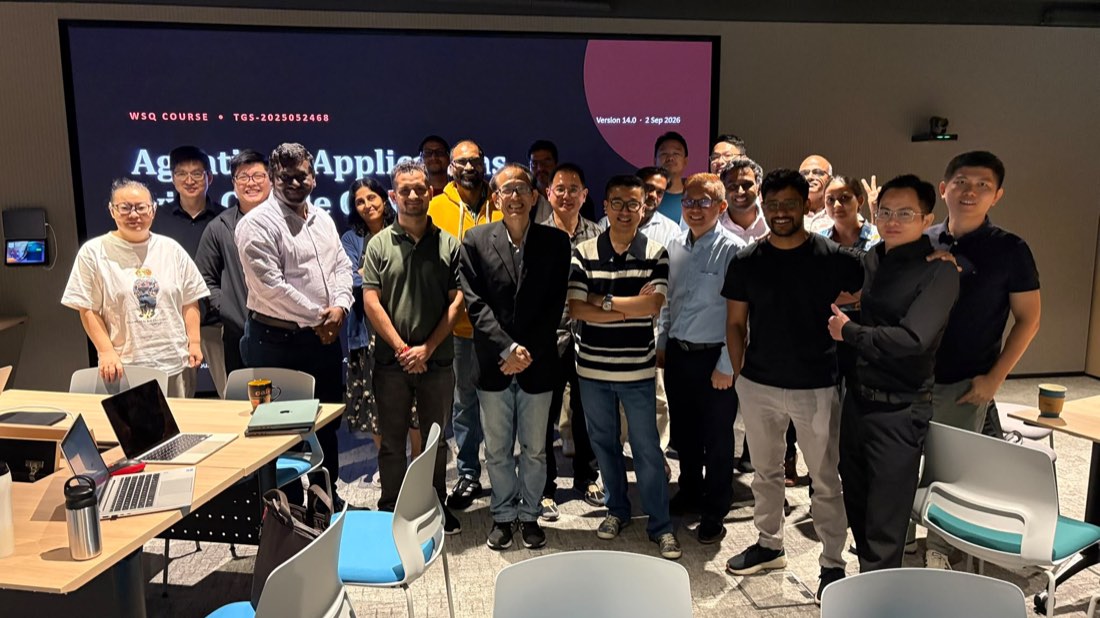
Today we ran our WSQ Agentic AI Applications with Claude Code class for 20 engineers from UOB’s infrastructure and development teams, at UOB’s Punggol Campus — UOB Tower 80. The class was led by Dr Alfred Ang. One day, one build: by the end of the session the room had a working PMO Kanban board on screen — drag-and-drop columns, work-in-progress limits, owners, due dates and a cycle-time view — assembled almost entirely by directing Claude Code in plain English and reviewing what came back.
We picked the project deliberately, and the audience is the reason. Infrastructure and development engineers do not need convincing that an agent can emit code — they need to know what happens to rigour when it does. A project management office is not a toy domain — it is a governance function, and the software that supports it has to be trusted. That makes it a much better teaching vehicle than another to-do app, because every design decision the class made had to survive the question a real PMO would ask: can I rely on what this thing tells me?
Why a PMO board is the right thing to build with an AI agent
Project offices run on a small number of stubbornly manual rituals: chasing status, re-typing updates into a tracker, reconciling one team’s definition of “done” with another’s, and assembling the weekly deck. None of that is intellectually hard. All of it is repetitive, rule-shaped and evidence-based — exactly the profile of work an agent handles well when you give it structure.
A Kanban board is also the clearest possible artefact for teaching agentic development, because its rules are explicit. Columns are states. WIP limits are constraints. A card moving right is a transition that either is or is not allowed. When you ask an agent to enforce a WIP limit, you find out immediately whether you briefed it well — the board either blocks the drop or it does not. There is nowhere for a vague instruction to hide.
The build: empty folder to working board
We started with nothing but a directory and a paragraph of intent. From there the class drove Claude Code through the loop the course is built around — instruct, inspect, correct:
- Describe the domain in plain English. A card has a title, description, owner, priority, due date, effort estimate and a state. States are Backlog, Ready, In Progress, Review, Done. That single paragraph is the entire specification the first version was built from.
- Let Claude Code scaffold it. Data model, persistence and a clean board UI with columns and draggable cards — generated, then read line by line on the projector rather than accepted on faith.
- Add the rules that make it a PMO tool. WIP limits per column, so “In Progress” refuses a sixth card. A blocked flag with a mandatory reason. An audit trail: every state change stamped with who moved it and when.
- Add the view a PMO actually reports from. Cycle time per card, throughput per week, and a count of cards sitting in Review longer than three days — the ageing report that turns a board into a management instrument.
- Review every diff. The class rejected changes as well as accepting them. That is the part people do not expect: an agentic workflow is not “fire and forget”, it is a tight supervision loop where your judgment is the scarce resource, not your typing speed.
Watching a board go from paragraph to working software in an afternoon changes the question in the room. It stops being “can AI write this?” and becomes “how do we constrain and supervise it so the output is dependable enough to run a portfolio on?” — which is precisely what the rest of the day covers.
Five agentic primitives, applied to the board
1. Custom commands
A custom slash command packages a prompt you re-use into a single word. The class built commands such as /standup — read the board, list what moved since yesterday, flag anything past its due date and anything blocked without a reason. A three-paragraph instruction becomes a one-word action that every member of the team runs identically. For a PMO this is how reporting stops being a person and starts being a procedure: the best status prompt anyone ever wrote becomes the whole office’s default.
2. MCP tools
The Model Context Protocol is how Claude Code reaches past the local folder — to browsers, databases, issue trackers and internal APIs — through one standard interface. In class we used an MCP server to drive a real browser and exercise the board end to end: create a card, drag it across four columns, confirm the WIP limit refuses the sixth. The point for a project office is the generalisation: the same mechanism is how an agent would read your actual project tracker or timesheet system, with access you explicitly grant and can revoke.
3. Skills
Skills are packaged expertise — instructions the agent loads when a task matches, so it follows your conventions instead of improvising. The class encoded their own definition of done into a skill: what a card must contain before it may enter Review, how a blocker must be written up, what a status note looks like. Where a custom command is a shortcut, a skill is a playbook the agent reads before it acts. Encode the standard once, and every future run inherits it.
4. Subagents
Subagents let one session delegate to focused workers — a reviewer that audits the code just written, or several agents exploring different parts of a codebase at once. We ran a review agent over the board and it flagged a state transition that skipped the audit trail, which the room had read past twice. The organisational lesson lands by itself: agentic AI scales the way teams scale, through delegation with a clear brief and verification of the result.
5. Hooks
Hooks are deterministic guardrails — scripts that run before or after the agent acts, whether or not the model “remembers” to. We wired hooks that run checks after every edit and block dangerous operations outright. In a bank this was the concept that drew the most questions, and rightly so: a hook is how a control becomes enforceable rather than advisory, because it does not depend on the model choosing to comply.
What the group took away
- A working PMO Kanban board built live — columns, WIP limits, blocked reasons, an audit trail and a cycle-time report.
- Hands-on practice with the five primitives of agentic development: custom commands, MCP tools, skills, subagents and hooks.
- A supervision habit: read the diff, reject freely, and treat the agent’s output as a proposal rather than a result.
- A governance mindset — hooks and review agents make AI-assisted work auditable, which matters doubly in financial services.
- Concrete ideas for their own desks: status roll-ups, automatic ageing reports, and project documentation that writes itself from the board’s own history.
Bring this class to your team
This session was delivered as on-site corporate training, with the build project chosen to match the audience — for a room of infrastructure and development engineers, that meant a PMO Kanban board. We run the same format for teams across banking, government and industry, and the public schedule of WSQ Agentic AI Applications with Claude Code (TGS-2025052468) is open for individual sign-ups.
Because it is WSQ-accredited, eligible Singaporeans and PRs pay a nett fee of $295 after 50% funding, or $195 under MCES / SME funding at 70% (full fee $500 before GST). SkillsFuture Credit and PSEA may be used to offset the balance, and sponsoring employers may claim absentee payroll and tap the SkillsFuture Enterprise Credit.
Frequently asked questions
Do participants need to be developers?
No. The class is written for IT professionals broadly — infrastructure engineers, developers, project managers and analysts attend side by side, as this UOB cohort did. Claude Code takes instructions in plain English; what the course teaches is how to brief, constrain and verify the work, not how to type the code yourself.
Can we build our own project instead of a Kanban board?
Yes — that is the point of the on-site format. We choose the build to match your team. A previous UOB group from IT support built a ticketing app; this infrastructure and development cohort built a PMO board. Tell us what your team lives with daily and we will anchor the day on that.
What exactly is agentic AI, as opposed to using a chatbot?
A chatbot answers; an agent acts. Agentic AI plans multi-step work, uses tools such as files, browsers and databases, checks its own results and iterates — inside constraints you define. The course teaches those constraints: custom commands, MCP tools, skills, subagents and hooks.
Is the course WSQ funded?
Yes. It is WSQ-accredited (TGS-2025052468). Eligible Singaporeans and PRs get 50% funding, rising to 70% under MCES or SME funding. SkillsFuture Credit and PSEA can offset the fee payable after funding, and sponsoring employers may claim absentee payroll and SFEC where eligible.
How long is the course, and can it run in the evening?
The public class runs as a full day, 9:30am to 6:30pm, with an evening option split across two sessions from 6:00pm to 10:00pm. Corporate runs at your premises are scheduled to suit your team.
What do we need to bring?
A laptop. Everything else — Claude Code, the MCP servers used in the exercises and the starter material — is set up in class.
