
You have no items in your shopping cart.
Blog / Inside UOB's Agentic AI Class: 24 IT Support Staff Build a Ticketing App with Claude Code
Inside UOB's Agentic AI Class: 24 IT Support Staff Build a Ticketing App with Claude Code
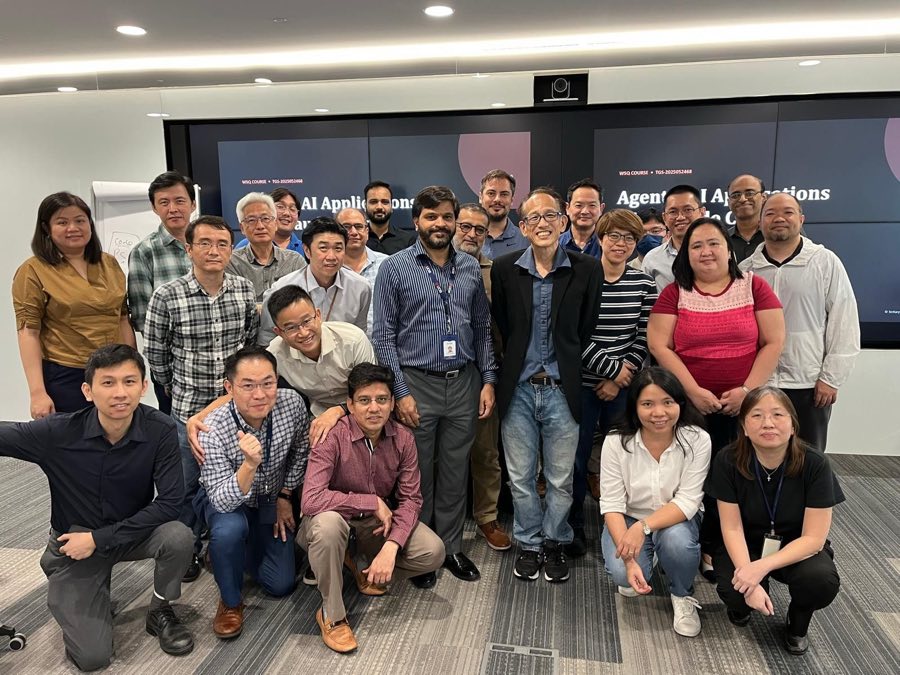
Today we brought our WSQ Agentic AI Applications with Claude Code class directly to UOB. Twenty-four IT support staff spent the day at the bank’s own premises, laptops open, building software the way agentic AI teams now build it — by directing Claude Code in plain English and reviewing what it produces. By the end of the session the group had a working IT support ticketing app on screen, and more importantly, a shared mental model of the five building blocks that make Claude Code an agentic platform rather than a chat window: custom commands, MCP tools, skills, agents and hooks.
Why agentic AI lands so naturally in IT support
IT support is a discipline of repeatable workflows: a ticket comes in, it gets categorised, prioritised, routed, worked, documented and closed. That structure is exactly what agentic AI is good at. An agent can read an incoming issue, ask clarifying questions, search a knowledge base, draft a fix and log every step — while the human stays in charge of judgment calls and approvals.
That is why we anchored the whole class on one artefact the participants live with every day: the ticketing system. Instead of toy exercises, every concept was taught by extending a real app the class had just watched come into existence.
The build: an IT support ticketing app, from empty folder to working system
We started with an empty directory and a one-paragraph brief. From there, Claude Code scaffolded and iterated the app live in front of the class:
- Describe the app in plain English — tickets with a title, description, category, priority, assignee and status.
- Let Claude Code scaffold the project: data model, storage, and a clean web UI for submitting and listing tickets.
- Iterate conversationally — add a dashboard with open-versus-resolved counts, filters by priority, and a status workflow (Open → In Progress → Resolved).
- Review the diff at every step. The class saw that an agentic workflow is not “fire and forget” — it is a tight loop of instruct, inspect, correct.
Watching an app take shape in minutes reframed the conversation. The question stopped being “can AI write code?” and became “how do we structure, constrain and supervise it so the output is dependable?” — which is precisely what the five concepts below answer.
Five Claude Code concepts, one real app
1. Custom commands
Custom slash commands package a prompt you use repeatedly into a one-word instruction. The class created commands like /triage — read a new ticket, classify its category, set a priority and suggest an assignee — so that a multi-paragraph instruction becomes a repeatable, shareable shortcut the whole team runs identically. For a support desk, this is how you standardise quality: the best prompt anyone on the team ever wrote becomes everyone’s default.
2. MCP tools
The Model Context Protocol (MCP) is how Claude Code reaches beyond the local folder — to browsers, databases and third-party services — through a standard interface. We showed how an MCP server lets the agent drive a real browser to test the ticketing app’s UI end to end, the same mechanism that would let a production support agent query an asset inventory or a monitoring dashboard. The takeaway for an IT team: MCP is the integration layer that turns an AI assistant into something that can act on your actual systems, with access you explicitly grant.
3. Skills
Skills are packaged expertise — instruction sets the agent loads when a task matches, so it follows your team’s way of doing things instead of improvising. We demonstrated how a skill can encode a team convention (how tickets must be documented, what a proper resolution note looks like) once, and then be applied consistently on every future run. Where a custom command is a shortcut for a prompt, a skill is a playbook the agent studies before acting.
4. Agents
Subagents let one Claude Code session delegate work to focused workers — a reviewer agent that audits the code just written, or parallel agents exploring different parts of a codebase at once. The class used a review agent on the ticketing app and watched it catch issues the group had missed. For IT support leaders, this is the organisational insight: agentic AI scales the same way teams do, by delegation with clear briefs and verification of the results.
5. Hooks
Hooks are deterministic guardrails — scripts that run automatically before or after the agent acts, whether the agent “remembers” to or not. We wired hooks that run checks after every code edit and block dangerous operations outright. In a bank’s environment this was the concept that resonated most: hooks are how governance becomes enforceable rather than advisory, because they do not rely on the model choosing to comply.
What the UOB team took away
- A working IT support ticketing app built live with Claude Code — and the full instruct-inspect-correct loop that produced it.
- Hands-on practice with custom commands, MCP tools, skills, agents and hooks — the five primitives of agentic development.
- A governance mindset: hooks and reviews make AI output auditable, which matters doubly in financial services.
- Ideas for their own desk — triage assistants, knowledge-base lookups, and automated documentation of fixes.
Bring this class to your team
This session was delivered as on-site corporate training at the client’s premises, tailored to an IT support audience — the same format we run for teams across banking, government and industry. The public schedule of WSQ Agentic AI Applications with Claude Code (TGS-2025052468) is open for individual sign-ups, and because it is a WSQ-accredited course, eligible Singaporeans and PRs can tap SkillsFuture funding support, while sponsoring companies may qualify for absentee payroll and SFEC claims.
Frequently asked questions
Do participants need a programming background?
No. The class is built for IT professionals broadly, not just developers. Claude Code takes instructions in plain English; the course teaches you to direct, structure and verify the work rather than type the code yourself.
What exactly is agentic AI, versus using a chatbot?
A chatbot answers; an agent acts. Agentic AI plans multi-step work, uses tools (files, browsers, databases), checks its own results and iterates — under constraints you define. The class teaches those constraints: commands, skills, hooks and review agents.
Can this course be run on-site for our company like it was for UOB?
Yes. We regularly deliver this class at client premises and tailor the build project to your context — for UOB’s IT support team, that meant a ticketing app. Contact us to arrange a corporate run.
Is the course WSQ funded?
Yes. It is a WSQ-accredited course (TGS-2025052468). Eligible Singaporeans and PRs can use SkillsFuture funding support, and sponsoring employers may claim absentee payroll and SFEC where eligible.
What tools do we use in class?
Claude Code as the agentic development environment, plus the surrounding ecosystem covered hands-on: custom slash commands, MCP servers, skills, subagents and hooks.
